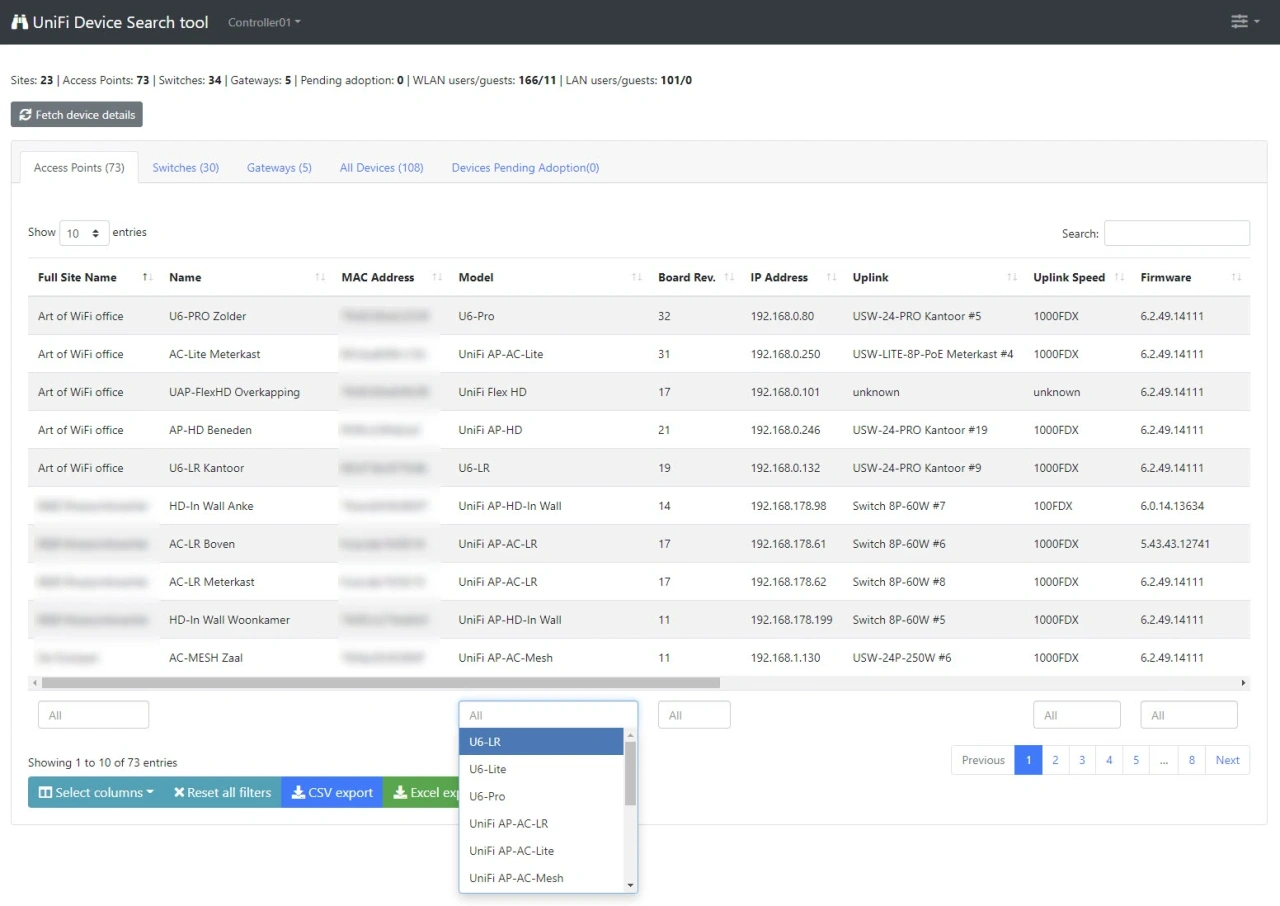
Easily find all UniFi devices across your Controllers
Search across all sites on your UniFi controllers in seconds. Find any gateway, switch, or access point by name, model, MAC address, IP, firmware version, or site, then export the results to CSV or Excel for audits and inventory.
Connect to multiple controllers or UniFi OS Consoles at once, using a local admin account, a Network Application API Key, or the Site Manager API via unifi.ui.com. Results are cached locally for faster repeat searches.
Used by 100s of UniFi administrators worldwide
Why network administrators choose this tool
Search across all sites
Find any device across every site on your controller with a single query. No more clicking through sites one by one.
Filter and sort
Narrow results by device type, model, status, firmware version, EOL/LTS state, board revision, or uplink speed.
Export to CSV or Excel
Download your filtered results for audits, inventory checks, RMA planning, or sharing with your team.
Multiple controllers
Connect to several controllers or UniFi OS Consoles at once and search across your entire infrastructure.
Three ways to connect
Use a local admin account, a Network Application API Key, or the Site Manager API via unifi.ui.com.
Built for speed
Local caching makes repeat searches instant, and built-in rate-limiting protects large controllers from overload.
See the tool in action
This video on our YouTube channel demonstrates the capabilities of the UniFi Device Search tool and its user-interface.
Requirements
Server
-
A web server running a recent Linux version with PHP 7.4 or higher and the php-curl extension installed.
-
Tested on Apache 2.4 with PHP 7.4, 8.1, 8.2, and 8.3. Other web servers such as nginx and LiteSpeed should also work.
Network connectivity
-
For a direct connection, each controller must be reachable from the web server on port 8443 (Network Application), port 443 (UniFi OS Console), or port 11443 (UniFi OS Server).
-
No direct network path? The tool can also reach your controllers through the Site Manager API via the unifi.ui.com cloud. This works for any cloud-enabled controller, including ones behind a firewall, on a remote network, or behind Starlink CGNAT where inbound ports cannot be opened.
UniFi controller
-
Supported platforms include the software-based Network Application, UniFi OS Server, and UniFi OS devices such as CloudKeys, UDRs, UDMs, and UDM Pros.
-
Network Application versions 5.x through 10.x are supported; version 10.2.97 has been confirmed to work. UniFi OS versions 3.x through 5.x are supported (5.1.3 confirmed).
Purchase a license
-
The one-time cost for a single license is € 51,00 (excluding VAT/Sales Tax). This includes access to updates for 12 months.
-
The actual VAT/Sales Tax is calculated upon checkout.
-
EU-based companies can enter their VAT number for 0% VAT.
-
Paddle, our billing partner, supports multiple payment methods depending on your country.
€ 51,00
Frequently Asked Questions
What does the UniFi Device Search Tool do?
It gives you a fast, unified search across all UniFi gateways, switches, and access points, across all sites in the selected UniFi controller/Network Application, so you can find devices by name, model, MAC address, IP, or site in seconds.
Which UniFi versions are supported?
It works with UniFi OS consoles (UDM/UDR/UXG), UniFi OS Server, and the classic Network Application (v5-v10). All recent Official Release and Early Access versions are supported (version 10.2.97 has been confirmed to work).
Can I search across multiple sites and controllers?
Yes. Point the tool at one of your controllers and search across all sites with a single query, then filter per site or device category if needed.
What can I filter or sort by?
Filter by device type (AP/switch/gateway), model, site, board revision, uplink speed, status (online/offline/adopting), LTS/EOL state, and firmware version, then sort by columns such as name, IP, MAC address, or model.
Is the data real-time?
Results are pulled live via the UniFi API when you search, so device status, IPs, and firmware version values are up to date at the time of the query.
Will it change anything on my UniFi controller?
No. The tool is read-only. It doesn't push config or modify devices; it only retrieves inventory and status via the API.
How do I connect to my UniFi controller?
Three options: use a local admin account, a Network Application API Key, or the Site Manager API via unifi.ui.com. The API Key option avoids MFA issues and is the recommended approach for direct access.
Can I export results?
Yes. Export the current result set to CSV/Excel for audits, inventory checks, RMA planning, or sharing with your team.
Does it help spot offline or outdated devices?
Yes. Use status, EOL/EOS and firmware filters to list offline devices or devices on specific firmware so you can prioritize fixes and upgrades.
How does it handle large controllers?
The tool is built to handle large controllers that manage thousands of devices with rate-limiting controls to throttle the load on your controller.
Is my data kept private?
Yes. The tool runs on your own web server, and queries go directly to your controllers (or through the Site Manager API for cloud connections). Any cached results are stored locally on the same web server, so no device or site data is sent to third parties. We recommend running the tool over HTTPS and restricting access to authorized users only.
Does the tool cache results locally?
Yes. The latest version supports local caching of data collected from your controllers. This means repeat searches are significantly faster because the tool doesn't need to query the API again for recently fetched data.
What is the Site Manager API and when should I use it?
The Site Manager API connects to your controllers through the unifi.ui.com cloud connection. This is ideal when your controller is not directly reachable from the web server (for example, behind a firewall or on a remote network). As long as the controller is cloud-enabled, the Site Manager API can reach it without opening additional ports.
Why don't I see a device I expect?
Check that the device is adopted in a site, that the API user has access to that site, and that you're searching on the correct controller/FQDN.
Does it include clients as well as devices?
This tool focuses on network devices. For client-level lookups and activity details, use our dedicated UniFi WAN and client usage reporting tool (https://artofwifi.net/unifi-wan-and-client-usage-reporting).