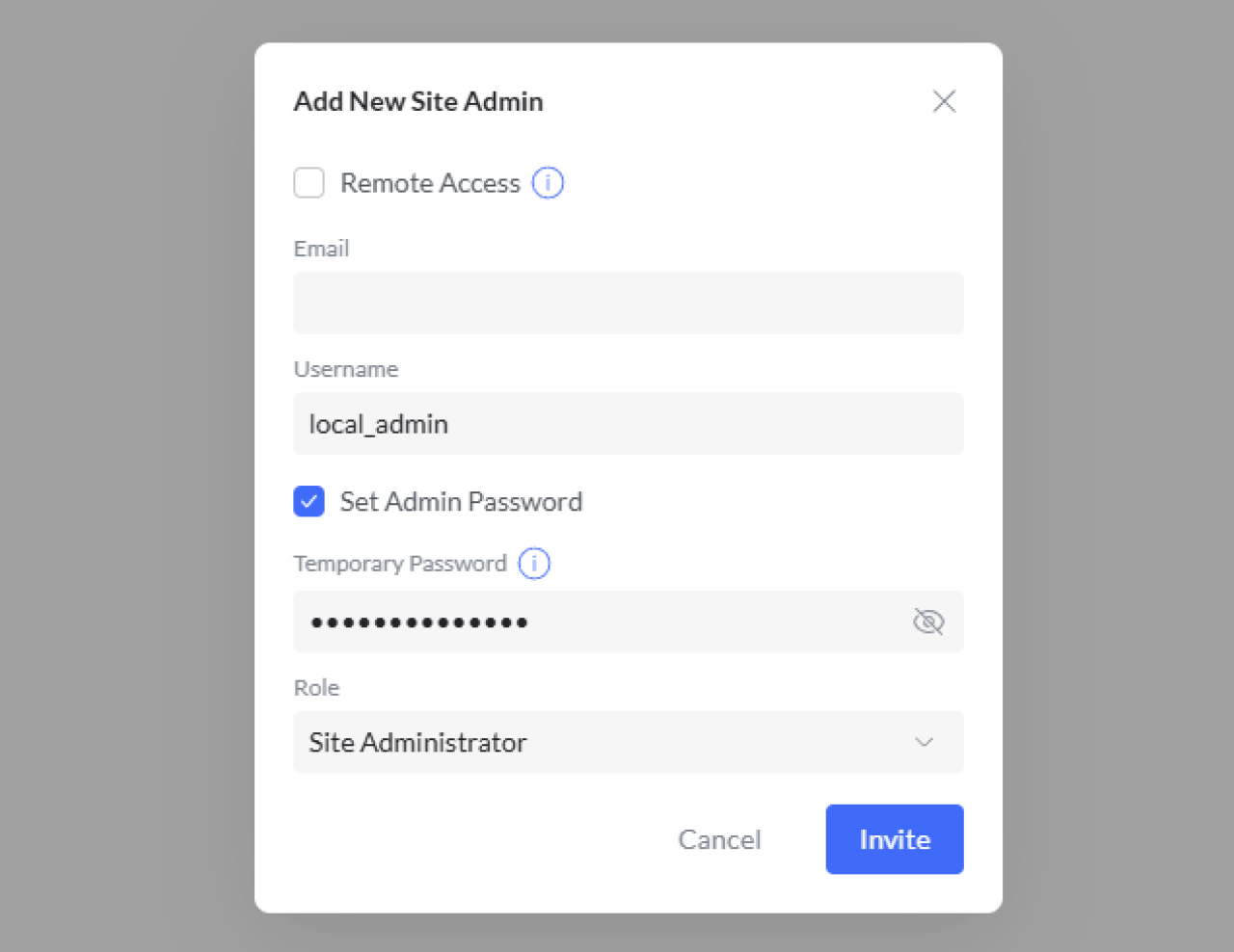
How to Create a Local Admin Account for UniFi API & Captive Portal Integrations (Avoid MFA)
If your Art of WiFi Captive Portal, reporting scripts, or other UniFi integrations suddenly started throwing errors after Ubiquiti's MFA rollout, you're not alone. Beginning July 22, 2024, Ubiquiti requires Multi‑Factor Authentication (MFA) for UI.com (cloud) accounts. Automated services and applications that attempt to log in with those cloud credentials get stalled at the second factor prompt and effectively lose API access. The original fix was to create a dedicated local admin (service) account on your UniFi console and use that for all programmatic API connections. Local accounts are not subject to the cloud MFA requirement and continue to authenticate cleanly.
🆕 Our captive portal solutions and the UniFi Device Search Tool now support two additional authentication options: a Network Application API Key (for direct connections) and a Site Manager API Key (for connections via unifi.ui.com). More Art of WiFi products will follow soon. Read our companion guide to understand the differences and choose the best method for your setup:
👉 UniFi API Authentication: Local Admin vs. API Key vs. Site Manager
Who should read this?
You should take action if you use any external tool that signs into the UniFi Network Application / controller on your behalf, including:
Art of WiFi Captive Portal & reporting tools
Other 3rd party, external, captive portal solutions
Home/business automation platforms (Home Assistant, etc.)
Custom scripts built on our UniFi‑API‑client library
Monitoring, billing, or MSP dashboards that poll UniFi stats
All of these rely on unattended logins through the API; MFA breaks unattended logins when using UI.com credentials. Community reports confirm breakage and successful resolution by switching to a local admin account.
Quick TL;DR
Create a dedicated local admin account (service account). Disable Remote/Cloud access for it. Grant the minimum role required (often Site Admin or View Only). Update your integration to use that username/password.‘ That’s it.’
‘Or,’‘ if you prefer keyless authentication or need to connect through unifi.ui.com, see our ‘‘full comparison of all three authentication methods’.
Why cloud logins with MFA break API integrations
UI.com accounts now require MFA; even if you don't enable an app‑based factor proactively, email verification is auto‑enabled after the enforcement date. Programmatic tools cannot satisfy an interactive second factor, so authentication fails or loops. Partners in the UniFi ecosystem (captive portal vendors, monitoring tools, automation frameworks) flagged this in advance because their products would lose access without a non‑MFA login path. Local admin accounts remain exempt, which is why nearly every vendor (including us) recommends moving integrations to a local account.
Common symptoms
Repeated MFA / verification prompts to the account owner’s email or authenticator app.
API calls returning 401 Unauthorized in logs.
External applications such as captive portals fail to connect. These patterns were widely reported in community forums when MFA enforcement began.
Local admin vs. UI.com (cloud) account: what's the difference?
UI.com (cloud) account: Centralized identity hosted by Ubiquiti; used for remote management and marketplace services. Subject to mandatory MFA.
Local admin account: Lives only on the UniFi console/Network Application you create it on. Can be scoped to specific sites and roles. Operates in local‑only mode with no cloud linkage; MFA not imposed. Official UniFi documentation distinguishes between remote cloud admins and local‑only management and shows where to add them in the Network Application UI.
What level of access does the service account need?
Most captive portal and reporting integrations need read/write access to the API — Site Admin is typically sufficient. For pure reporting (read‑only stats pulls) you can grant View Only to reduce risk. UniFi’s role matrix (Full Management, Site Admin, View Only, Hotspot Operator, etc.) lets you scope the least privileges required. Our older advisory showed Site Admin as the safe default; choose tighter roles if your workflow allows.
Step‑by‑Step: Create a Local Admin Account
Good practice: Name the account something service‑oriented (e.g.,
aow-cp-svc), do not reuse a personal email, and store the password in a secure vault.
Before you start
Confirm which UniFi platform you’re on (UniFi OS console such as UDM, UCG, UX, etc. vs. self‑hosted software install).
Confirm your running version; menu names changed between Network Application 7.x, 8.x, 9.x, and 10.x.
Decide the role and which sites the account should see.
A. UniFi OS Consoles (UDM, UCK, UX, etc.)
Log in to the UniFi OS Console web UI with an existing admin.
Go to Admins & Users (label may read Admins in some versions).
Create New User( + ).
Check the Admin checkbox.
Restrict to local access only / Disable Remote Access so the account is local (wording varies by version).
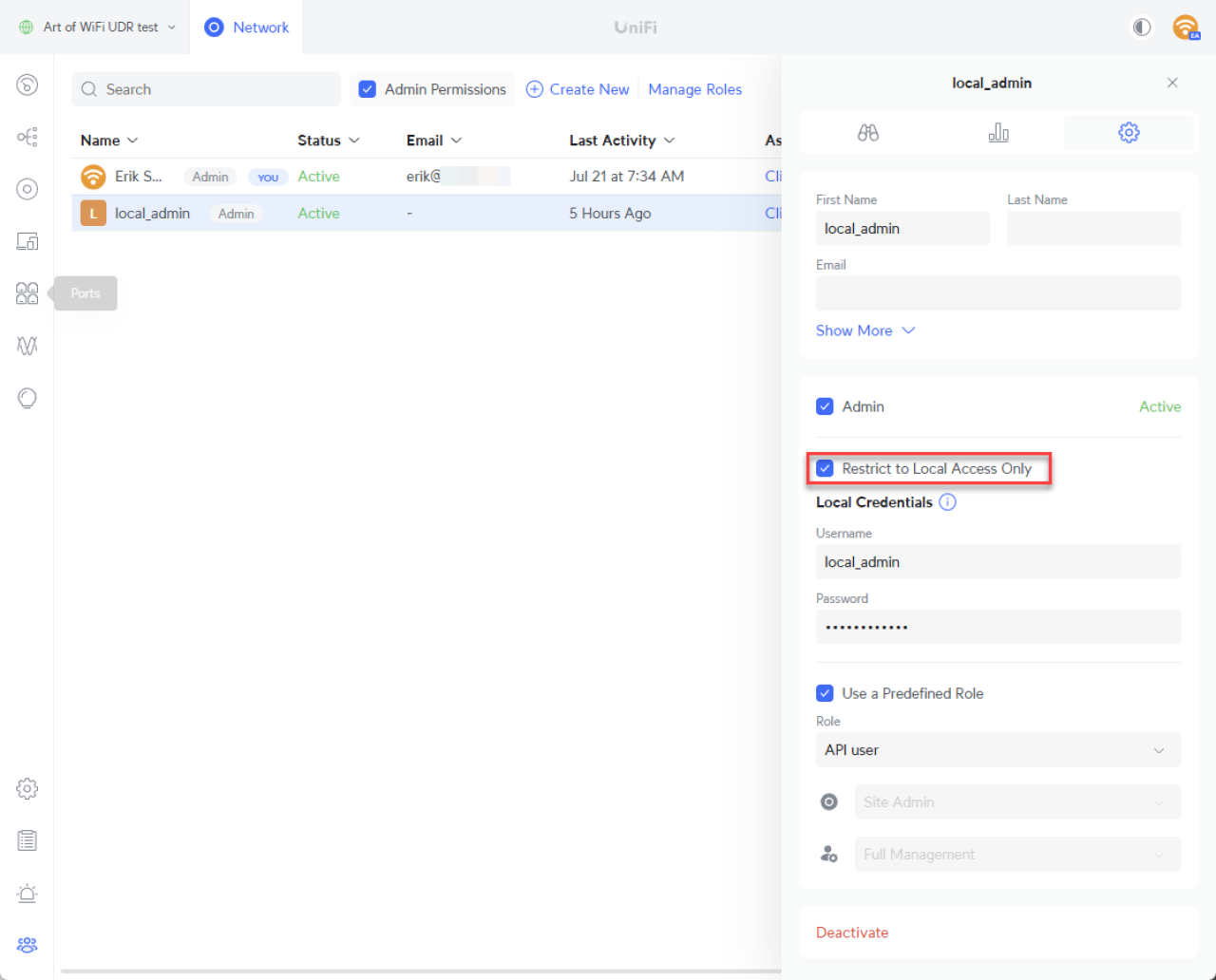
Username & Password: Enter a username (doesn’t need to be an email) and set a strong password.
Role / Permissions: Uncheck Use pre‑defined role if present; assign Site Admin (or minimum required) for the Network Application. Select None for other sections where no permissions are needed.
Create.
Test login locally at
https://<console-ip>/using the new credentials.
B. Self‑Hosted Software install
Sign in to the Controller/Network Application.
Navigate to Admins.
Select Current Site if you wish to restrict the Local Admin account to the current site.
Click on plus icon (+) to add a new admin.
Uncheck Remote Access (ensures local‑only).
Select Set Admin Password (check the box if required) and enter the username and password.
Assign Role: Choose Site Administrator (or View Only for read‑only/reporting).
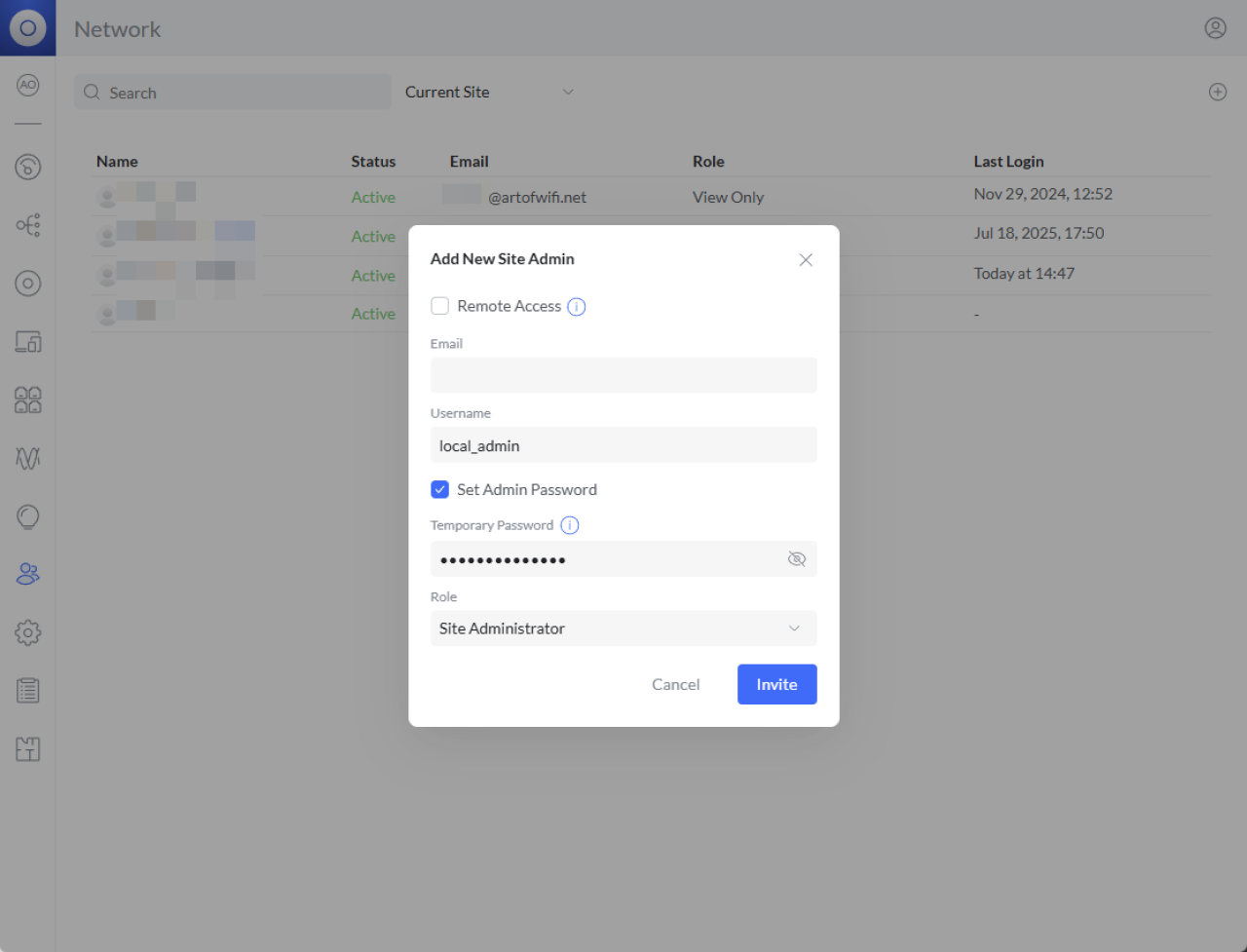
Invite / Save, then log out and back in with the new local credentials to finalize.
These steps mirror the guidance we published in 2024 and remain valid; wording may vary in 8.x/9.x/10.x UI but the flow is unchanged.
‘Update Your Integration’
‘Art of WiFi Captive Portal & Tools’
Open your portal’s or tool’s ‘UniFi connection settings’‘ and replace the stored credentials with one of the supported authentication methods:’
‘Local admin username/password’‘ (covered in this article). The classic approach, works with all console types including the legacy self-hosted Network Application.’
‘Network Application API Key’‘. Requires the latest release of your Art of WiFi product and a direct connection to a UniFi OS console or Server. No username/password needed.’
‘Site Manager API Key’‘. Requires the latest release of your Art of WiFi product; connects through unifi.ui.com, ideal when your console has a dynamic IP, is behind CGNAT, or is otherwise not directly reachable. UniFi OS console or Server only.’
‘For a detailed comparison of when to use each method, see our ‘‘companion guide’.
‘If you connect over WAN using the local admin method, ensure firewall rules permit HTTPS (port 443 on UniFi OS consoles, port 11443 on UniFi OS Server, or 8443 on older software controllers) from your portal host to the console.’
Authentication methods the Art of WiFi captive portal can offer (beyond email capture)
Even though this article is about API credentials, it’s a good moment to revisit guest authentication options you can add to your UniFi guest network with the Art of WiFi captive portal:
Email registration & verification (great for marketing follow‑up).
SMS / mobile phone verification with one‑time passwords (OTP).
Azure Entra ID / Microsoft 365 (OAuth2) single sign‑on for students/staff.
Social logins (Facebook, Instagram) and sponsored access approval flows.
Security Best Practices for Local Admin Accounts
Practice | Why do it? | Where set? |
|---|---|---|
Least privilege (View Only vs Site Admin) | Limits damage if credentials leak. | Role picker when creating the admin. |
Local‑only, no Remote Access | Prevents MFA prompts; keeps credentials usable for integrations and automation. | Admin creation dialog. |
Dedicated account per integration | Easier to audit logs & revoke without breaking others; recommended by multiple vendors when adapting to MFA. | Create multiple local admins. |
Site-specific accounts | Limits damage if credentials leak. | On self-hosted controllers/Network Applications or CloudKeys; select Current Site before creating the admin account. |
Strong, vaulted passwords | Service accounts are high‑value targets. | Use password manager/secret vault. |
Rotate credentials (set reminder) | Mitigates long‑lived credential risk. | Ops runbook. |
Related
👉 UniFi API Authentication: Local Admin vs. API Key vs. Site Manager
Frequently Asked Questions
I created a local account but my integration still fails.
Confirm Remote/Cloud access was disabled and that you are pointing to the correct console hostname/IP and port (443 for UniFi OS, 11443 for UniFi OS Server, or 8443 for older self-hosted software). Also verify the role has sufficient permissions; some integrations fail silently if given View Only.
Will local accounts eventually require MFA?
Ubiquiti has not announced such a change; current MFA enforcement applies to UI.com accounts. Vendors continue to recommend local accounts for automation.
Can I just disable MFA on my UI.com account?
After July 22, 2024, UI.com automatically enforces a verification method (email if nothing else). Local accounts are the reliable path for non‑interactive API use.
Does a local admin need an email address?
No; you can create a username without email, which is common for service accounts used by Home Assistant and other integrations.
Which port should my integration use?
UniFi OS consoles expose the Network Application over HTTPS 443, older consoles and standalone software controllers use 8443, and UniFi OS Server uses port 11443.
Seeing 401 Unauthorized after enabling MFA?
If the integration still uses a UI.com email, switch it to the new local account. Community threads show 401 errors immediately after MFA enablement until a local admin was used.
Can I use an API key instead of a local admin account?
Yes. The latest releases of our captive portal solutions and UniFi Device Search Tool support authentication using a Network Application API Key (direct connection to a UniFi OS console) or a Site Manager API Key (connection via unifi.ui.com). See our companion guide on UniFi API authentication methods for details on when each method is appropriate.
Which authentication method should I choose?
It depends on your network setup. Local admin credentials remain the most broadly compatible option and work with all console types including the legacy self-hosted Network Application. API keys are simpler (no password rotation needed) and the Site Manager method solves connectivity challenges like CGNAT or dynamic IPs. Our companion guide covers the trade-offs in detail.
Posted on: July 17th, 2025
By: Erik Slooff
On: UniFi
API
MFA
UniFi
About the author

Erik Slooff
Owner & Lead Developer
For more than 10 years I’ve specialised in UniFi® guest-WiFi solutions—ranging from email-capture and SMS phone-number verification to Azure Entra ID single-sign-on and multi-site analytics dashboards. Posting as @slooffmaster in the Ubiquiti Community, I’ve contributed 160 + posts, 8300 + replies and 300 + accepted solutions that help network admins worldwide. Today our solutions secure and provide analytics for 2500 + UniFi networks across retail, hospitality, government and education in 70 + countries. Customers use our solutions to authenticate users, meet regional privacy requirements (GDPR, CCPA, etc.) and unlock marketing or loyalty insights, and more. When I’m not refining captive-portal flows, you’ll find me benchmarking new UniFi firmware or contributing to our open-source code on GitHub.